


德国倍福公司的 TwinCAT PLC软件在半导体及泛半导体行业有着非常广泛的应用。随着SECS/GEM标准互联接口在智能工厂的推广和使用,越来越多的工厂要求设备通过SECS/GEM标准通信协议与工厂EAP/MES建立通信实现自动化作业生产。 由于倍福官方没有提供SECS/GEM的软件产品,对于采用倍福TwinCAT PLC软件作为主控的设备,通常需要借助一台上位机PC,由熟悉工厂自动化的上位机软件工程师,使用高级语言(C++,C#等)进行SECS/GEM通信接口开发,该种方式存在以下缺点: 需增加上位机PC,增加硬件成本; 需寻找专门写工厂自动化的高级语言软件开发工程师,增加软件人力成本; 对于PLC主控设备,PLC开发工程师不能自由的和工厂EAP/MES进行对接,所有数据、事件、报警均需要中转; 为了让TwinCAT PLC开发工程师能直接进行SECS/GEM通信接口开发,珂矽为倍福TwinCAT PLC定制开发了SECS/GEM PLC通信库KXTCGEM Lib,无需增加任何硬件,也无需上位机编程,直接在TwinCAT PLC项目中通过调用ST语言封装的通信方法快速实现SECS/GEM接口,以下是对该库程序的介绍。 1. 支持的SEMI标准版本…
SEMI Standard Implemenation and Integration
Software Services
- Software development kits for various SEMI software standards
- Training and integration of SEMI software standards
- Semiconductor equipment control system solutions
- Solving communication issues between equipment and factories
- Cross-platform software implementation solutions
Software Products
- KXGEM – Equipment side SECS/GEM SDK
- KXGEM300 – Equipment side GEM300 SDK
- KTM – Equipment Control Software Framework
- KXHost – Host side SECS/GEM/GEM300 SDK
- KXGEMTester – EAP SECS/GEM/GEM300 Simulator Application
- KXPandora – Smart Gateway Between PLCs and EAP
- KXTCGEM – TwinCAT SECS/GEM ST Language Library
- KXINOGEM – Innovance SECS/GEM ST Language Library
Technolgy Support
- Software Development Kit Integration
This is the choice of most clients. After purchasing a software development kit,Kxware professional instructors provide face-to-face training on software development and integration. After the training, clients can complete the integration of the software library independently. If clients encounter problems during the software integration development process, they can contact Kxware ‘s professional engineers at any time to resolve the issue together. In this collaboration method, Kxware will not have access to the client’s core code, ensuring that the client’s IP address is not leaked.
- General Hardware Module Development Service
To facilitate clients’ rapid software integration of general semiconductor device hardware, Kxware has developed a large number of general hardware control code libraries, which are provided free of charge to framework product users. To encourage clients to continuously expand this hardware library, we offer general hardware development services, providing clients with the hardware source code for development free of charge. After the client completes hardware testing, the program is added to the hardware library as a library file.
- Team Leadership Service
For startups facing inexperienced software development teams, Kxware offers a team leadership service. Through training and guidance, Kxware leads the client’s software team to complete the software development work for their first equipment project until the client’s team can fully take over the equipment project. Short-Term Software Outsourcing Service: For clients facing urgent equipment delivery schedules where the software team cannot complete software development on time, Kxware will dispatch professional developers to participate in joint equipment code development on a short-term basis, accelerating the equipment software development progress.
- Purchase and Use of Software Tools
After purchasing Kxware software, Kxware support team provides development guidance. If clients encounter problems during use, they can seek solutions from Kxware ‘s technical staff through various channels such as WeChat groups, telephone, and email.
- Email Us : sales@kxware.com
- Contact Us : [China] +86 2158112810 . [Singapore] +65 87426961

Provide professional consulting services for semiconductor equipment-side software development.
Focusing on software serving for the semiconductor industry
Software Product Running Status
We collaborate with our clients' engineers to develop semiconductor equipment control software, jointly resolve various issues encountered during equipment operation, deliver new machines to factories on schedule, and work together to ensure successful equipment acceptance. We firmly believe that our clients' success is our success!
99
Customers
99
Projects
99
Tool Types
99
Runtime License
Customer Ceremonies
We provide software solutions for semiconductor equipment manufacturers, reducing the difficulty of developing equipment control software and growing together with our customers.
Testimony From C Customer
SECS/GEM集成方案|设备控制软件方案

Testimony From SEMI
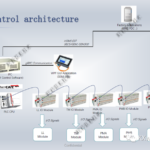
SEMI软件标准集成方案

Testimony From D Customer
GEM300集成方案|设备控制软件方案
Testimony From B Customer
GEM300集成方案|设备控制软件方案

Testimony From PVD CVD Customer
KTM半导体设备控件软件框架
Testimony From GZ VAC Tool Customer
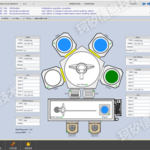
KTM半导体设备控件软件框架
Product Usage Instructions
It is a long established fact that a reader will be distracted by the readable content of a page when looking at its layout.
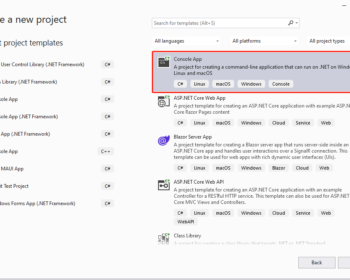
KXGEM300 SDK 快速使用介绍
本文对如何使用KXGEM300 SDK快速创建一个满足GEM300通信标准的应用程序,只需简单3步完成。 第一步:创建.NET Console程序 从VS2022新创建.NET 6 Console Application, 项目命名QuickGem300。 第二步:添加KXGEM300 Nuget引用 通过Nuget添加Kxware.ToolAutomation软件库 第三步:创建SECS/GEM对象并进行初始化 点击此处下载源代码 完成! 程序启动后,默认采用HSMS通信方式,打开5000,5001端口进行监听。使用KXGEMTester或者其他第三方SECS/GEM测试工具可以对上述GEM300…
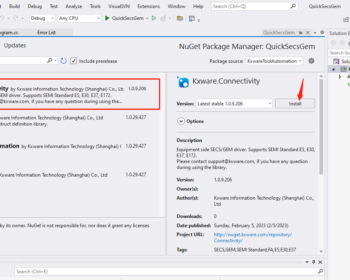

KXGEM SDK 快速使用指南
本文对如何使用KXGEM SDK快速创建一个满足SECS/GEM通信要求的应用程序,只需简单3步完成。 第一步:创建.NET Console程序 从VS2022新创建.NET 6 Console Application, 项目命名QuickSecsGem。 第二步:添加KXGEM Nuget引用 通过Nuget添加Kxware.Connectivity软件库 第三步:创建SECS/GEM对象并进行初始化 点击此处下载源代码 完成! 程序启动后,默认采用HSMS通信方式,打开5000,5001端口进行监听。使用KXGEMTester或者其他第三方SECS/GEM测试工具可以对上述SECS/GEM…