SECS/GEM Library for INOVANCE PLC
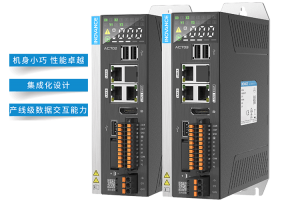
Applicable controller type: Inovance PLC controllers based on the Linux system with CODESYS runtime.
1. Basic Information
1.1 Compliant with SEMI standards
- SEMI E5 – SEMI EQUIPMENT COMMUNICATIONS STANDARD 2 MESSAGE CONTENT (SECS-II)
- SEMI E30 – Specification for the Generic Model for Communications and Control of Manufacturing Equipment (GEM)
- SEMI E37 – Specification for High-Speed SECS Message Services (HSMS) Generic Services
- SEMI E172 – Specification for SECS Equipment Data Dictionary (SEDD)
1.2 Software Library Features
- ST language function block encapsulation library, providing access to high-efficiency background service programs through a C language interface.
- Compliant with SEMI E5/E30/E37 standards, supporting all functions of SEMI E30 GEM.
- Each PLC can simultaneously support multiple HSMS port communications.
- PLC programming eliminates the need to handle low-level SxFy messages; simply call the logic layer API and message callbacks.
- Includes diagnostic and debugging tools for convenient EAP interconnection testing.
1.3 Meet SECS/GEM Fundamental GEM Requirements
- Communication State Machine
- Control State Machine
- Equipment Processing States
- Host-Initiated S1,F13/F14 Scenario
- Control (Operator-Initiated)
- Event Notification
- On-line Identification
- Error Messages
- Documentation
1.4 Contains Additional GEM Capabilities
- Event Notification
- Data Variable and Collection Event Name List Requests
- Dynamic Event Report Configuration
- Trace Data Collection
- Variable Data Collection
- Equipment Constants
- Spooling
- Alarm Management
- Remote Control
- Process Recipe Management
- Material Movement
- Equipment Terminal Services
- Clock
- On-line Identification
- Limits Monitoring
- Control (Operator-Initiated)
- Document Transfer
- SEDD
- Limits Monitoring
1.5 List of Supported SECS/GEM Messages
S1F1,S1F2,S1F3,S1F4,S1F13,S1F14,S1F15,S1F16,S1F17,S1F18,S2F13,S2F14,S2F17,S2F18,S2F23,S2F24,S2F25,S2F26,S2F31,S2F32,S2F33,S2F34,S2F35,S2F36,S2F37,S2F38,S2F41,S2F42,S5F1,S5F2,S5F3,S5F4,S5F5,S5F6,S5F7,S5F8,S6F1,S6F2,S6F5,S6F6,S6F11,S6F12,S7F19,S7F20,S7F5,S7F6,S9F0,S9F1,S9F3,S9F5,S9F7,S9F9,S10F3,S10F4
* Supports secondary development to implement custom SxFy message sending and receiving processing.
2. SECS/GEM Integrated Development Basic Process
2.1 Import KXINOGEM PLC library file

2.2 Define Global SECS/GEM Instance
Create the FB_GEM derived function block, and create the global object of the function block.
(*Create a custom FB_GEM extension function block*)
FUNCTION_BLOCK PUBLIC FB_MySecsGem EXTENDS FB_GEM

(*Define global function block variables*)
VAR_GLOBAL
	GEM	:	FB_MySecsGem;
END_VAR
2.3 Initialize SECS/GEM configuration
Override the OnInitializationStart method of the extended function block to complete the registration of SECS/GEM configuration.
(*Register GEM Variables – used by S1F3,S1F11,S2F23,S6F1,S2F13,S2F15,S2F29 etc*)
RegisterVariable(
    -1,                              (*SVID, -1 means that the system automatically allocates ID number.*)
    enumValueFormat.ValueFormat_F8,  (*Value Type*)
    enumVariableType.SV,             (*Variable Type: SV,DV,EC*)
    'TemperatureReading',            (*Variable Name*)
    'C',                             (*Unit Name*)
    '25',                            (*Default Value*)
    '0',                             (*Range: Min Value*)
    '100',                           (*Range: Max Value*)
    TRUE,                            (*Persistent setting, auto restore after reboot*)
    'PMA temperature reading');      (*Description message*)

(*Register GEM Events – used by S2F33,S2F35,S2F37,S6F11 etc*)
RegisterEvent(
    -1,                              (*Collection Event ID,-1 means that the system automatically allocates ID number.*)
    'RecipeStarted',                 (*Event Name*)
    'RecipeName|ChamberName',        (*Event associated variable names*)
    'Recipe start event');           (*Event description message*)


(*Register GEM Alarms – used by S5F1,S5F3,S5F5,S5F7,S6F11 etc*)
RegisterAlarm(
    -1,                               (*Alarm ID,-1 means that the system automatically allocates ID number.*)
    enumAlarmCode.PersonalSafety,     (*Alarm Code*)
    'OverTempAlarm',                  (*Alarm Name*)
    'ChamberName|TemperatureReading', (*Alarm associated variable names*)
    'Over temperature alarm',         (*Alarm Text*)
    'Over temperature alarm');        (*Alarm description message*)

(*Register Remote Command Names – used by S2F21,S2F41,S2F49*)
RegisterRemoteCommand('PP-SELECT');   (*Recipe Select command*)
RegisterRemoteCommand('START');       (*Recipe Start command*)
RegisterRemoteCommand('STOP');        (*Recipe Stop command*)
RegisterRemoteCommand('ABORT');       (*Recipe Abort command*)
2.4 Project code API integration
Call the FB_GEM API at the appropriate location in the customer’s PLC project to implement functions such as SECS/GEM data, events, alarms, and remote commands.
3. SECS/GEM Programming Example
3.1 GEM Communication State Machine
The PLC code calls the following API to manipulate the SECS/GEM communication status.
GEM.Enable();                   (*Enable SECS/GEM communication*)
 GEM.Disable();                  (*Disable SECS/GEM communication*)
 GEM.Offline();                  (*Switch to Offline control state*)
 GEM.OnlineLocal();              (*Switch to Online Local control state*)
 GEM.OnlineRemote();             (*Switch to Online Remote control state*)
3.2 Updating Status Data
PLC reports temperature and pressure data to the factory’s EAP system.
GEM.SetValue_LREAL('TemperatureReading', 123.45);
GEM.SetValue_LREAL('PressureReading', 567.89);
GEM.SetValue_LREAL('RecipeName', 'ABC.rcp');
3.3 Event Notification
The PMA cavity module begins executing the process recipe file ABC.rcp and reports the S6F11 event message to the factory.
GEM.TriggerEvent('RecipeStarted', 'RecipeName|ChamberName', ABC.rcp|PMA');
3.4 Reporting Equipment Processing Status
When the equipment enters production operation, the S6F11 reports its status to the factory and updates the SV data value simultaneously.
Gem.SetProcessState(enumProcessState.Executing);
3.5 Alarm Notification
The PMA process chamber temperature is too high, triggering an alarm that reports the S5F1 alarm message and alarm temperature data to the factory.
GEM.AlarmSET('OverTempAlarm', 'Temperature too high', 'ChamberName|TemperatureReading', 'PMA|123.45');
3.6 Remote Control
After the PLC receives S2F41 START remote command from the factory, PLC begins to run the process recipe program.
IF Command = 'START' THEN
          PLC_Process.fsmStep := 1000;
          GEM.AddLog(enumLogType.Info, 'PLC', 'Received START remote command');
END_IF
3.7 Equipment Constant
The factory remotely modifies the alarm temperature setpoint OverTempThreshold (EC constant) in the PLC code via S2F15. The code retrieves the current EC setpoint.
OverTempThreshold := GEM.GetValue_LREAL('OverTempThreshold');
3.8 Terminal Message
PLC receives and processes the terminal message sent by the factory S10F3, and displays the terminal message on the PLC HMI interface.
METHOD PROTECTED OnReceivedTerminalMessage : BOOL
VAR_INPUT
          TerminalID     :        INT;
          Message        :        STRING(255);
END_VAR
PLC_UI.ui_terminal_recv_msg := Message;
4. Debugging Tool
4.1 Tool Panel
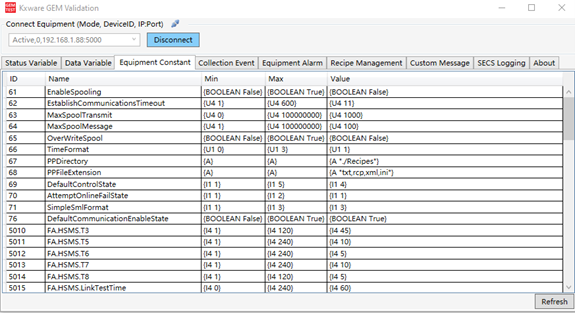
SECS/GEM communication status diagnostic tool for PLC SECS/GEM application.
- Remotely connect to the PLC and perform diagnostic analysis of the SECS/GEM function.
- Supports broadcasting to find and connect to all PLC devices running SECS/GEM services within the network.
- Supports remote viewing and modification of all device variables, events, and alarms.
- Supports viewing and exporting real-time SECS message logs in SML format.
- Supports exporting device VID, Collection Event, and Alarm data to Excel for creating GEM manuals.
- Supports viewing historical alarms and events.
- No coding required; supports manual event and alarm triggering for SECS/GEM debugging during development.
- Supports exporting SEMI E172 SEDD (SECS Device Data Dictionary) files.

4.2 GEM Validator
To facilitate testing of the PLC SECS/GEM program, a factory EAP simulator is provided for remote connection to the PLC program for simulation testing.
- Supports one-click viewing of GEM data, events, and alarm information in PLC devices
- Supports viewing SECS/GEM SML messages
- Supports manually sending custom SECS/GEM messages